Introduction
The Bulk Reinstate feature in Connect Max allows users to automatically restore previously published layouts (carousels) when approving product updates - either individually or in bulk.
This ensures that:
- Product carousels remain live across retailers
- Manual rework is minimized
- Layout consistency is maintained during updates
Where to find the feature
The feature is available in the Product Approval window the Shopper Experience Platform via the following URL: https://supplier.brandbank.com
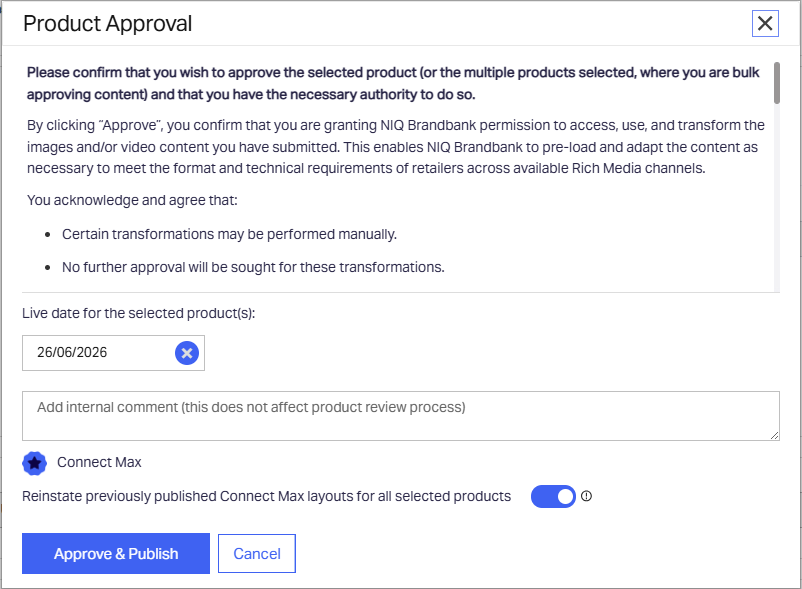
Within this screen:
- Locate the Connect Max section
- Find the toggle:
“Reinstate previously published Connect Max layouts for all selected products”
When to use Bulk Reinstate
Use Bulk Reinstate when:
- Updating existing (previously published) products
- Performing bulk approvals
- Releasing new product versions where layouts already existed
- Ensuring continuous carousel visibility after updates
Step‑by‑Step Instructions
Step 1: Select Products
- Navigate to your product list
- Select one or multiple products for approval
Step 2: Open Approval Window
- Click Approve or Bulk Approve
Step 3: Set Live Date
- Define the Live Date (e.g., 26/06/2026 shown in the screen)
Step 4: Enable Bulk Reinstate
- In the Connect Max section, toggle ON:
✅ Reinstate previously published Connect Max layouts for all selected products
Step 5: (Optional) Add Internal Comment
- Add notes for internal tracking if needed
Step 6: Approve & Publish
- Click Approve & Publish
Bulk Reinstate & Default Layout Enhancements
The following enhancements make it easier to maintain Connect Max layouts during product updates and approvals.
1. Reinstate Previously Published Layouts
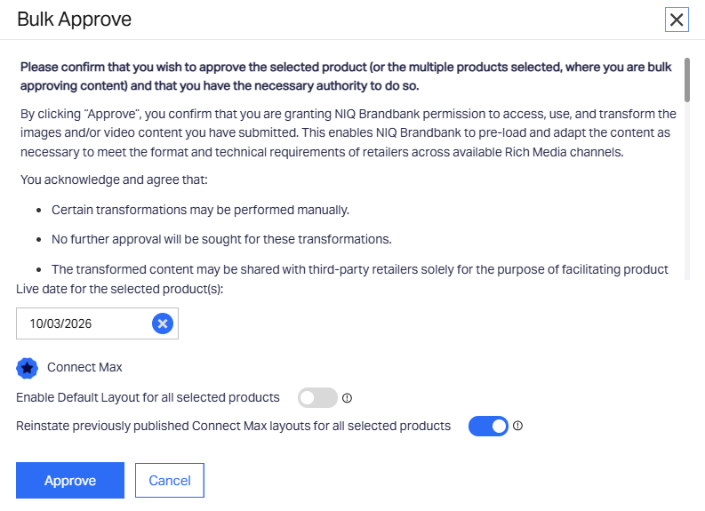
All Connect Max customers can automatically reinstate the last published layout during single or bulk approval. A new toggle in the approval window – “Reinstate previously published Connect Max layouts for all selected products” - restores the layout without opening each product. If imagery has changed, layouts update automatically based on available images.
2. Default Layout Enablement (M2M Customers Only)
M2M workflows disable prior layouts when new versions arrive. A new toggle - “Enable Default Layout for all selected products” - lets M2M customers reapply their standard default layout in bulk. This ensures carousels remain active, especially for retailers requiring Connect Max content. Feature activation requires an IT ticket.
3. Bulk Approve for Live Products
Bulk Approve now supports Live products with a Connect Max licence and company-level default layout enablement, allowing reinstatement and default-layout actions at scale.
Was this article helpful?
That’s Great!
Thank you for your feedback
Sorry! We couldn't be helpful
Thank you for your feedback
Feedback sent
We appreciate your effort and will try to fix the article